
Opera Mail 9 and 10 - Default Port - Setup Guide
Important Points
- First you need to make sure the email address(es) you will be sending from have been authorised for your account in our Control Panel .
- These instructions assume your email account has already been setup and is collecting email correctly.
- Take a note of any settings you change.
- Only change the items specified - you should not need to change either your email address, POP3 server, POP3 username / password.
- These instructions are only for Opera 9.x and 10.x - for other email programs please see How To Setup AuthSMTP or contact us.
- We have instructions for both default SMTP port and alternate SMTP port configurations - alternate port is generally used if your ISP blocks the normal port 25 SMTP access (as many do these days!).
Step One
- Load Opera 9.x or 10.x
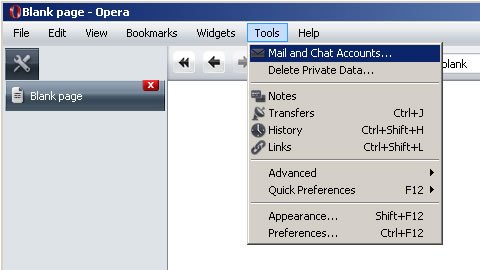
- Go to the 'Tools' Menu and click 'Mail and Chat Accounts...'
Step Two
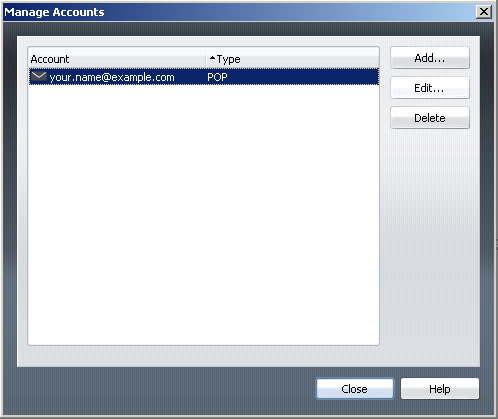
- Choose the email account you wish to use with the AuthSMTP service
- Click 'Edit...'
Step Three
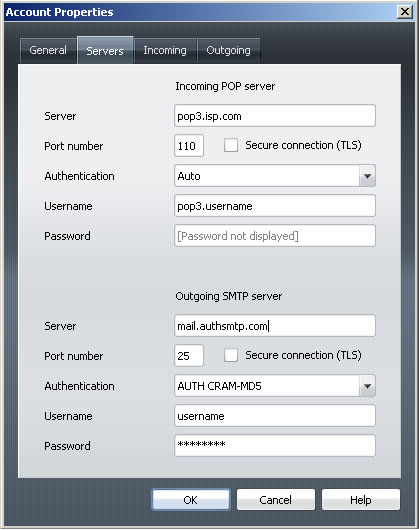
- Go to the 'Servers' tab
- In the 'Outgoing SMTP Server' section in the bottom half of the window change the 'Server' to the one in the confirmation email we sent to you
- Change 'Authentication' to 'AUTH CRAM-MD5'
- Enter the AuthSMTP username and password that was given to you in the confirmation email
- Click 'OK'
Step Four
- You should now be back to the main Opera 9.x screen
- Close Opera and then reload
- Check you are online then test to ensure you can send mail correctly
- All done!