
Infacta GroupMail 5 - Setup Guide
Important Points
- First you need to make sure the email address(es) you will be sending from have been authorised for your account in our Control Panel .
- Take a note of any settings you change.
- Only change the items specified - you should not need to change your incoming email settings.
- These instructions are only for Infacta GroupMail 5.x - for other email programs please see How To Setup AuthSMTP or contact us.
Step 1
- From the main menu - select the 'Tools' menu then the 'Account Manager'option.
- Select 'New' to create a new account.
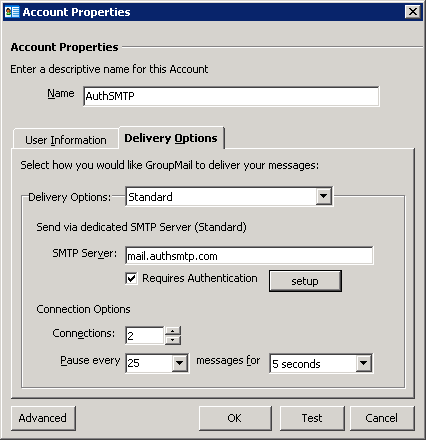
- Enter a 'Name' for the account.
- Enter the AuthSMTP server we supplied - for example: mail.authsmtp.com
- Tick 'Requires Authentication'.
- Click the 'Setup' button
Step 2
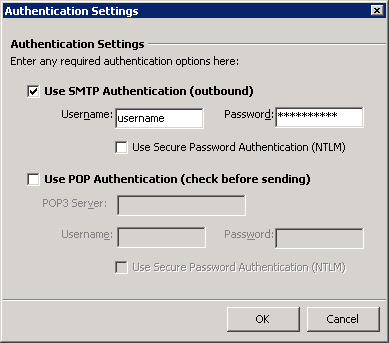
- Enter the AuthSMTP username and password we supplied when you signed up.
- Click 'Ok' to be taken back to the previous screen.
Step 3
- Click the 'Advanced' button.
Step 4
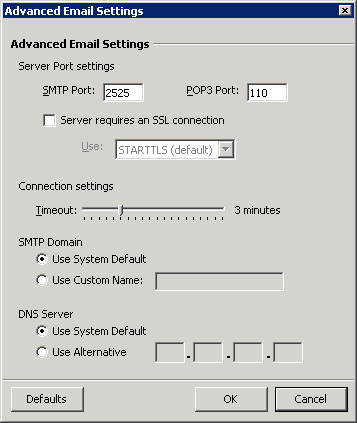
- Change the SMTP port to 2525.
- Click 'Ok' to go back to the previous screen.
Step 5
- Click 'Ok' again to return to the main 'Account Manager' screen.
- Click 'Close' to return to the main 'GroupMail' screen.
- Done!