
Microsoft Exchange 2007 - Alternative Port
Important Points
- First you need to make sure the email address(es) you will be sending from have been authorised for your account in our Control Panel .
- You cannot configure your Exchange server to automatically forward email to a remote email address using your AuthSMTP account, for more information please see - Can I use AuthSMTP to automatically forward email?
- These instructions assume you have already setup your AuthSMTP send connector in Exchange 2007 using the instructions on the Exchange 2007 setup page
- By default Exchange 2007 will attempt to connect to the AuthSMTP servers on the default SMTP port 25, if you wish to change this to one of the Alternative ports (2525, 23, 26) you will need to take the following steps
Step One
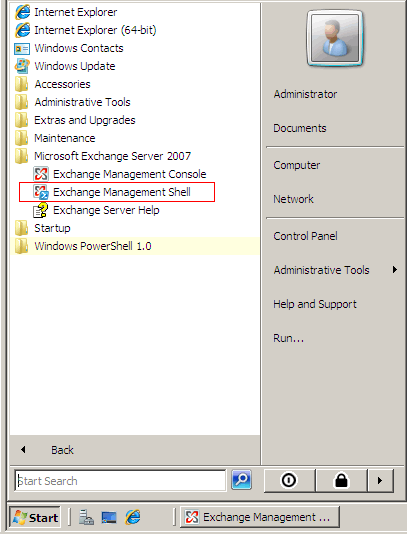
- Open the 'Exchange Management Shell'
Step Two
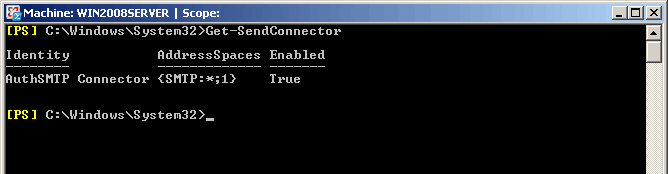
- Type the following command to get a list of all your send connectors:
Get-SendConnector
Step Three
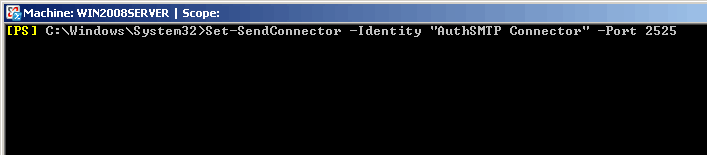
- To change the SMTP port for your connector you will need to enter the following command
Set-SendConnector -Identity "AuthSMTP Connector" -Port 2525
Step Four
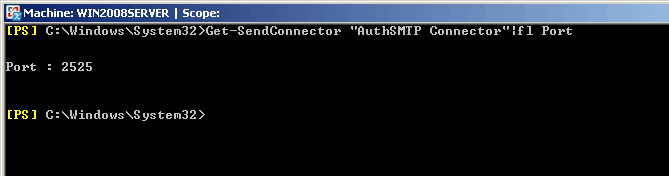
- To confirm the change has been accepted you can enter the following command
Get-SendConnector "AuthSMTP Connector"|fl Port
Step Five
- You should now be able to send messages via AuthSMTP on the alternative port 2525