
Microsoft Exchange 2007 - SSL/TLS Setup
Important Points
- These instructions assume you have already setup your AuthSMTP send connector in Exchange 2007 using the instructions on the Exchange 2007 setup page .
- Microsoft Exchange 2007 has a new feature called 'Opportunistic TLS' which is enabled by default upon installation, this feature means Exchange 2007 will negotiate a secured SSL/TLS session wherever possible and encrypt the message. Further information can be found on Microsoft's Technet Website .
- By default SSL/TLS is not enabled on AuthSMTP accounts.
- If you do wish to use SSL/TLS please login to the control panel and enable it on your account.
- If you do not wish to use SSL/TLS you will need to take the following steps to disable this feature in Exchange 2007.
Step One
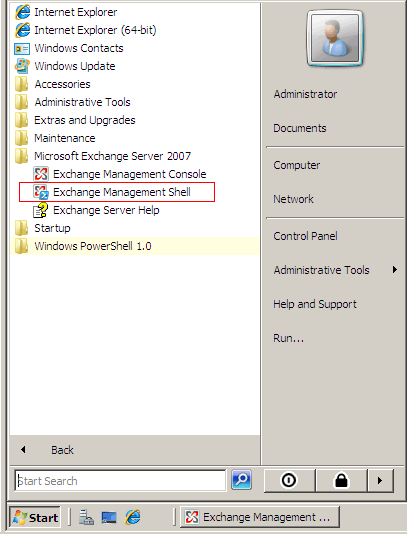
- Open the 'Exchange Management Shell'
Step Two
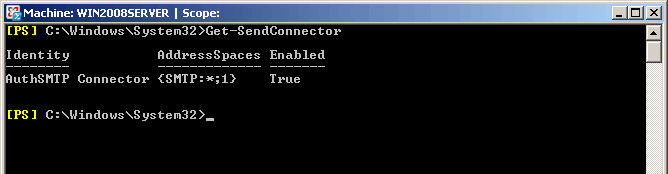
- Type the following command to get a list of all your send connectors
Get-SendConnector
Step Three
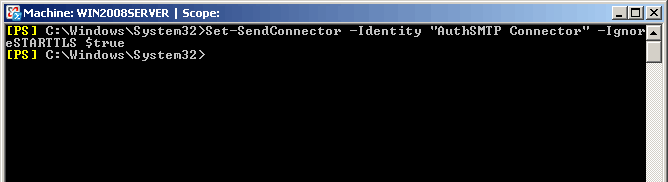
- To disable 'Opportunistic TLS' you will need to enter the following command
Set-SendConnector -Identity "AuthSMTP Connector" -IgnoreSTARTTLS $true
Step Four
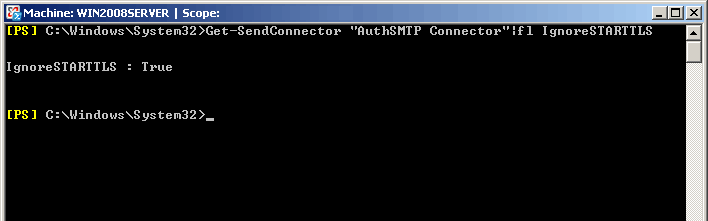
- To confirm the change has been accepted you can enter the following command
Get-SendConnector "AuthSMTP Connector"|fl IgnoreSTARTTLS
Step Five
- You should now be able to send messages via AuthSMTP without Exchange 2007 trying to negotiate a SSL/TLS connection.
Step Six
Step Seven (Optional)
- If you wish to change the default port that Exchange 2007 will connect to AuthSMTP on to one of the alternative ports please see Exchange 2007 - Alternative Port .